 Vatsal Shah
 If Saleshandy is on your radar, you should read this detailed and unbiased Saleshandy review before you make a decision.
Every cold outreach platform promises:
- Better inbox placement
- More replies
- More meetings booked.
But only a few deliver!
So the real question is this:
Is Saleshandy another tool full of claims, or does it actually perform when you run real campaigns?
To find that I tested it myself with real campaigns.
In this review, I share what worked well, what could improve, and whether Saleshandy is worth choosing in 2026.
Saleshandy Review– TOC
TL;DR: Is Saleshandy Worth It?
Here is a quick rundown of my findings after using Saleshandy in real outreach campaigns.
Quick Verdict
I tested Saleshandy for 2 whole months and ran 5 campaigns.
Saleshandy proved to be reliable for booking meetings and generating leads through cold emailing.
The best part!
It is easy to scale, offers high deliverability, and is cost-effective!
Key Strengths
- Inbox placement monitoring to spot issues early and fix deliverability problems before they impact results
- All-in-one solution for cold email outreach
- Highly affordable compared to other tools
- Easy to scale sending volume by connecting more email accounts at no extra cost
- Ensures high inbox placement with advanced deliverability features
- Inbuilt B2B lead database to find verified contacts for campaigns
- Email account health tracking to maintain sender reputation
My Rating Snapshot
- Ease of use: 4.7 out of 5
- Deliverability results: 4.8 out of 5
- Automation and sequences: 4.6 out of 5
- Value for money: 4.9 out of 5
- Support quality: 4.8 out of 5
Key Limitations
- The entry-level plan does not include unlimited team members, AI variants, A to Z testing, etc.
- It only offers a 7-day free trial to test its capabilities.
What Saleshandy Is and Who It Is For
Saleshandy is an AI-powered cold outreach automation platform.
You can use it to connect with your prospects with personalized messages and convert outreach into booked meetings and closed deals.
Saleshandy is a great fit for
- Agencies that manage outreach for many clients
- Founders and small teams looking to book meetings and grow their pipeline
- Recruiters reaching candidates at scale
- Consultants and freelancers building outbound systems
My Experience Using Saleshandy
I used Saleshandy for 2 months and ran 5 real outreach campaigns to test performance.
My goal was to see if it could handle the entire outbound process without needing extra tools or complex setup.
Here is what I did inside the platform
- Set up domains and email accounts without technical struggle
- Warmed up new mailboxes to build sender trust
- Found relevant prospects through the built-in data search
- Enriched prospect data with more in-depth information before outreach
- Created personalized sequences using the built-in AI assistant
- Managed replies in the unified inbox with complete context
- Tracked where my emails were landing using Inbox Radar
- Monitored the performance of campaigns and shared reports
Cost-wise, I found Saleshandy more affordable than other cold email software in the market.
In 2 months of testing, I spent $72 and booked meetings of $8k in business value.
Overall, Saleshandy made cold email outreach much easier for me.
Moreover, me and my team were able to focus on meaningful conversations instead of manual tasks.
What Users are Saying
Saleshandy has highly positive ratings on G2, Capterra, and TrustPilot, with hundreds of reviews across the three platforms:
- G2 Rating: 4.6/5 ⭐️ (700+ reviews)
- Capterra Rating: 4.5/5⭐️ (120+ reviews)
- TrustPilot Rating: 4.3/5⭐️(80+ reviews)
Here’s a brief look at some of the latest reviews from a diverse range of users:
“Reliable Email Outreach Tool with Smart Automation Features”
Richard found Saleshandy to be the best cold email outreach tool due to its ease of use, seamless integration, and focus on high email deliverability.

“Great Results for B2B Outreach”
Saleshandy was a game-changer for Mirza’s outreach efforts, thanks to its intuitive interface and highly responsive customer support.

“Extremely Helpful and Handy for Cold Email Outreach”
Vicky says Saleshandy stood out from all the other tools he has used due to its personalization features, automatic sender rotation, and CRM integrations.

Top Features of Saleshandy
Now that we’ve explored what Saleshandy is, let me show you how it adds value to your cold outreach efforts with its features:
- Advanced Cold Email Sequences
- Personalization
- Email Warmup & Deliverability Tools
- Unified Inbox
- B2B Lead Database
- Agency Management Features
- Email Infrastructure Support
- Integrations
- Reporting Dashboard
Let’s get into the details!
1. Advanced Cold Email Sequences
With Saleshandy, I was able to create as many campaigns as I wanted.
So, I broke down my prospects into small groups to send highly tailored emails.
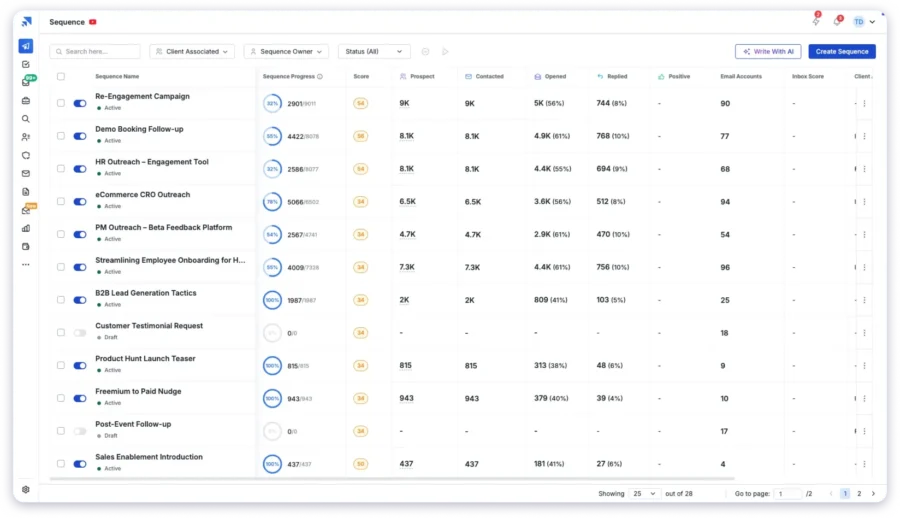
The best part here was the AI Sequence Copilot!
It is Saleshandy’s in-built AI assistant that I used to quickly create multiple cold email sequences.

All I need to do is add basic details like:
- Your ideal customer profile (ICP)
- Your offer
- Business goals

And Saleshandy will automatically generate an entire personalized sequence.
Another feature that helped me a lot was Subsequences.
It lets you create multiple trigger-based follow-ups based on how your leads interact with your emails.

You can set conditions like:
- Lead replied or didn’t reply
- Specific keywords in their response
- Link clicks or status updates
It’s powerful. Because instead of sending generic follow-ups to everyone, you’re reacting in real time, without lifting a finger.
2. Personalization
With more and more sales teams running cold outreach, personalization is what helps your emails actually stand out—and get replies.
Here’s how Saleshandy makes personalization easy (and scalable):
Merge Tags
These are dynamic placeholders that pull in details like {{first_name}}, {{icebreaker}}, {{pain_point}}, and more—so you can send personalized cold emails at scale without doing it all manually. :
Variable Tags
Variable merge tags take things a step further by using conditional logic to customize content based on recipient data—like their location, department, or even the time of day. You can also use it to reflect sender details or other custom fields.
Example:
“Good {{time_of_day}}, {{first_name}}! As a {{department}} leader, you’ll love how [Tool] simplifies {{if department == “Sales”}}pipeline tracking{{else}}project management{{end_if}}.”

Spintax
Spintax (short for spin syntax) helps you send slightly different versions of the same email by randomizing specific words or phrases. This keeps your emails from sounding robotic or repetitive—and helps you dodge spam filters.
Example:
Use {spin}Check this out|You’ll love this|Have you seen this?{endspin} to randomly rotate greetings in your email.
Personalized Videos
Saleshandy integrates with tools like Sendspark, Sendler, and Pitchlane, so you can easily drop personalized videos into your cold email sequences. It makes your outreach more engaging and more effective.
I saw nearly an 8% bump in replies after adding personalized videos to one of my recent campaigns. It works.
3. Email Warmup & Deliverability Tools
Warm-up is a critical part of cold email outreach.
Saleshandy has partnered with TrulyInbox to give you the best warm-up service.
You can warm up your accounts for free with every paid plan.
What’s more, you can add unlimited email accounts for warm-up.
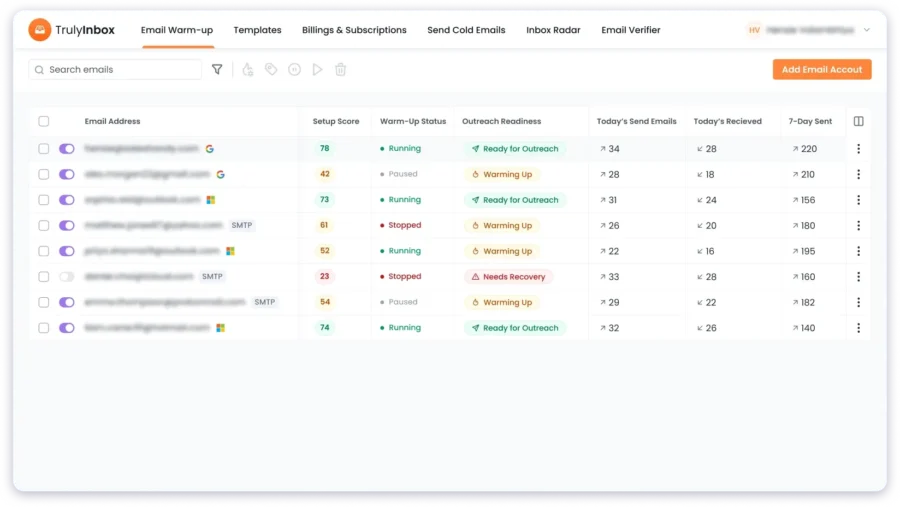
Apart from it, Saleshandy also offers these deliverability features to ensure your maximum email deliverablity:
- ESP Matching
- Sender Rotation
- AI-Powered Bounce Detection
- Sequence Score
- A–Z Testing
- and more
4. Unified Inbox
The unified inbox feature helped me stay organized and respond faster without jumping between multiple email accounts.
Here is what stood out
- All replies from every connected mailbox appeared in one place
- I could see full conversation history and context for each prospect
- Sorting and filtering made it simple to focus on active leads
- Follow up tasks were easier because nothing got missed or buried

Moreover, Saleshandy uses AI to categorize your replies automatically:
- Interested
- Meeting Booked
- Not Now
- Do Not Contact Again
This saved a lot of time and removed the usual confusion when handling replies across many accounts.
Especially during high-volume sending!
5. B2B Lead Database
To find leads, I directly used Saleshandy’s built-in Lead Finder.
It gives you access to a
- vast database of 700M+ professional contacts and 60M+ companies.
- real-time email verification
- AI-powered search assistance

What I found super helpful were the filters. I could search by name, location, company, domain—even social media links. It took me just a few minutes to find the right leads I wanted to reach.
6. Agency Management Features
Managing outreach for multiple clients isn’t easy—especially when you’re handling different industries, team members, and campaigns all at once. Without the right setup, things can get messy fast.
That’s why I found Saleshandy’s Agency Management Features so useful.
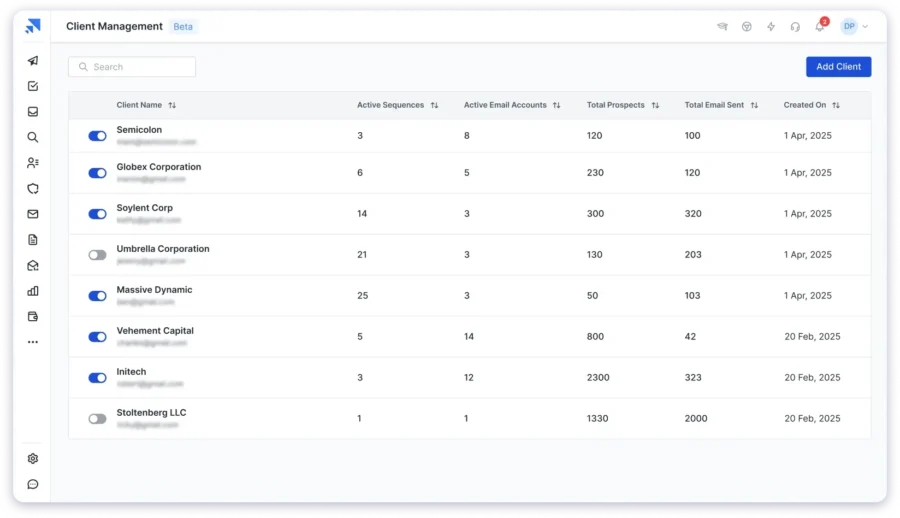
You get a clean, easy-to-use dashboard where you can create, manage, and monitor all your client campaigns from one place.
And if you want to present your agency more professionally, you’ll love the white-label option.
I was able to customize the entire platform with my agency’s name, logo, and domain—it looked like our own software, not a third-party tool.
Sharing campaign updates with clients is also super simple. You can give them:
- Full access, if you want them to jump in, tweak sequences, or reply to leads directly.
- Or view-only access, if you’d rather they just keep an eye on the results without making changes.
This balance of control and transparency made it much easier for me to build trust with clients.
7. Email Infrastructure Support
One thing that really frustrated me when I first got into cold emailing was how much time and effort it takes to set up email accounts for outreach properly.
You need to authenticate your domain, set up the right DNS records, warm up your inboxes, and build a solid sender reputation from scratch.
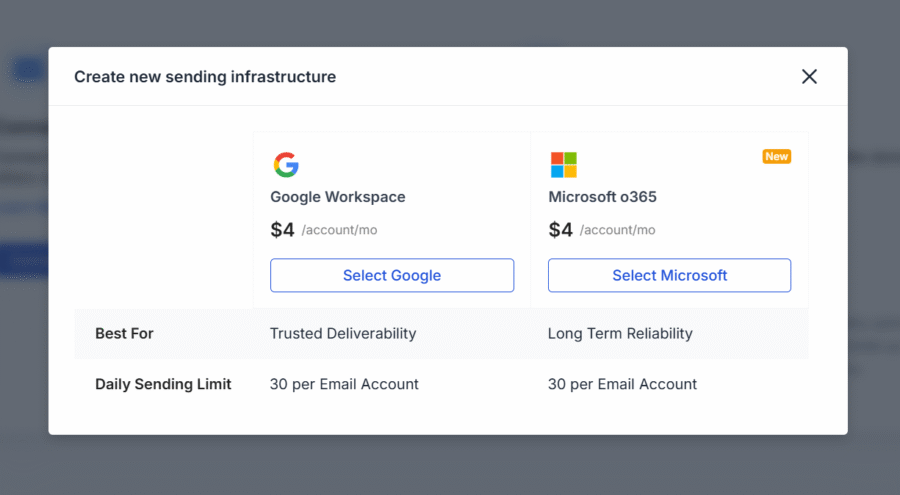
If you don’t get it right, your emails could start landing in spam—or worse, your domain could get blacklisted altogether.
Well, Saleshandy’s Email Infrastructure can save you from this trouble.
Here’s what you will get:
- New email accounts that are clean and ready for outreach
- Full technical setup, including authentication and DNS configuration
- Domain forwarding for lookalike domains
8. Integrations
If your tools don’t work well together, you’ll end up wasting hours manually syncing data and switching between platforms.
Saleshandy makes this easier by offering native integrations with major CRM platforms like Salesforce, HubSpot, Zoho, and Pipedrive—so your team can stay productive without juggling multiple tools.

And if you’re using other apps? No problem.
You can also connect Saleshandy with your existing workflow using APIs, Webhooks, or Zapier to keep everything in sync.
9. Reporting Dashboard
The real success in cold emailing comes from constant optimization, doubling down on what’s working, and fixing what’s not.
With Saleshandy, you will get an intuitive reporting dashboard that gives you a graphical overview of your cold email campaigns.
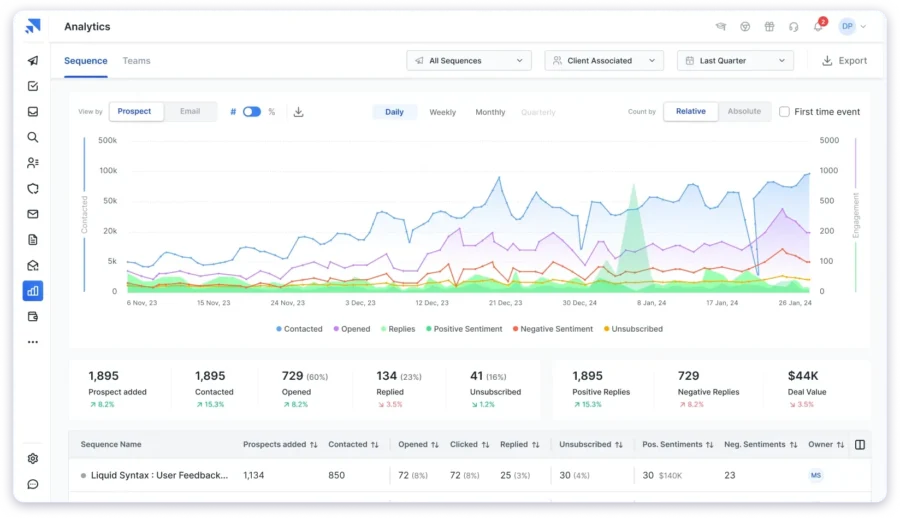
You can track all the key metrics from reply rates, deal values, prospect sentiment—and review them through visual reports.
Honestly, Saleshandy gave me the clearest insights into what was actually working.
It helped me make smarter decisions—because I could actually see which changes led to more replies, meetings, and conversions.
Pros and Cons of Saleshandy
Next, let’s check out Saleshandy’s pros and cons to see if its strengths outweigh its limitations:
Pros
- User friendly interface that keeps setup simple
- Targeted cold email sequences with built in personalization tools to improve replies
- Connect unlimited email accounts at no extra cost
- Unlimited warm up to build and maintain sender reputation
- Built in Lead Finder with verified contacts for 700M+ professionals from 60M+ companies
- Real time email verification to avoid invalid or outdated contacts
- Detailed analytics to track performance and improve campaigns
- Native integrations with Salesforce, HubSpot, Zoho, and PipeDrive
- Responsive customer support that resolves issues quickly
- Flexible pricing for solopreneurs, startups, and growing teams
- White label solutions for agencies that want to run campaigns under their own brand
Cons
- Only available with a seven day free trial
Saleshandy’s Pricing Plans
Saleshandy gives you more value for your money.
One thing I really appreciate about Saleshandy is that: No matter what plan you choose, you can:
- Connect unlimited email accounts,
- Add unlimited prospects
- Manage unlimited clients
- Get unlimited email warmup
Here’s a quick breakdown of its four pricing plans, each designed to help you scale your cold email outreach:

Add-Ons
- Bulk Email Verification
- B2B Lead Finder
- Email Infrastructure
To find out the complete list of features you get with different pricing plans, you can visit the pricing page.
Final Verdict on Saleshandy
Through this review, I’ve shown you how Saleshandy is an affordable cold email software that gives you everything you need to successfully create, launch, and scale cold email campaigns.
In my opinion, its unlimited email warmup, built-in B2B database, and trigger-based automation make it a standout choice in a crowded market!
But if you’re still on the fence about whether Saleshandy is the right tool for you, why not explore its features yourself?
Try Saleshandy for free for 7 days without providing any credit card details, and discover if it’s the right tool for you!
Saleshandy Review: FAQs
1. How Many Emails Can I Send With Saleshandy in a Day?
There is no fixed daily sending cap inside Saleshandy.
The main limit is the total number of emails available per month based on the plan you select.
That said, I recommend you send no more than 30-50 emails a day from a single email account.
If you want to send more emails safely, you will have to add more accounts.
For example: To send 250 emails a day, I recommend connecting 5 to 8 email accounts.
2. Is Saleshandy Good for Agencies?
Yes, Saleshandy is a cost-effective and scalable choice for agencies.
Here is why:
- You can add and manage unlimited clients
- You can create unlimited teams and invite as many team members as you want to help manage client outreach.
- You can connect unlimited email accounts to scale your outreach
All this at no additional charges and at affordable pricing.
3. Does Saleshandy Include Email Warm Up?
Yes, Saleshandy provides free email warm-up through a native integration with TrulyInbox.
You can connect unlimited email accounts for warm-up with any Saleshandy subscription plan.

4. Does Saleshandy Provide Leads or Only Send Emails?
You can find leads for your outreach in Saleshandy using the Lead Finder.
It has over 700M+ contacts from over 60M+ companies globally.
5. Is Saleshandy Worth the Price for Small Teams?
Absolutely, in my opinion, Saleshany is very much worth it for small teams.
It is easy to scale and provides advanced deliverability features at an affordable price.
6. Who Should Choose Saleshandy and Who Should Avoid It?
Saleshandy works well for:
- founders
- agencies
- SDR teams
- recruiters
- and anyone who needs to book meetings through cold email.
But if you need a full CRM or want a heavy multichannel sales platform, another tool might suit you better.
Check out this list of 9 Saleshandy Alternatives.
7. Are There Any Hidden Costs With Saleshandy?
From what I have seen and experienced, there are no hidden charges with Saleshandy.
The pricing page clearly shows exactly what each plan includes and what you will pay.